Overview
Base network diagram when using Nola Edge deployment (may contain one or more AI processing units) is pictured below.
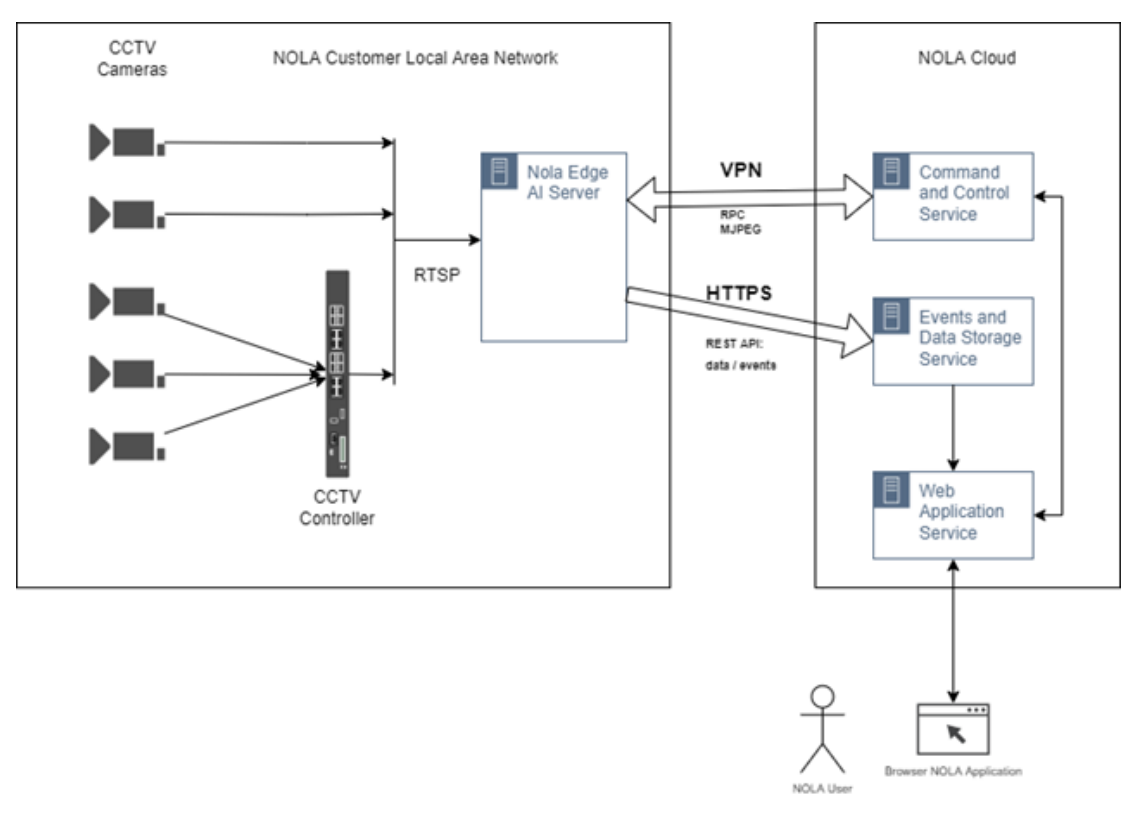
Major Data Flows
Data Flow 1. Video Streams
Nola Edge AI Server consumes CCTV video streams via standard RTSP access, directly from cameras or CCTV Controller, subject to client configuration. When configuring those video streams Nola will only require RTSP URI for each video stream, usually this would be username/password protected URI, e.g.: rtsp://USERNAME:PASSWORD@192.168.1.109/cam/realmonitor?channel=1&subtype=0
These video streams do not require any additional protection as an entire data flow is within the local area network.
Data Flow 2. Command and Control
Nola Edge AI Server will require access to Nola Cloud Command and Control Service, usually via public internet. This is a 2-way initiated data flow carried over VPN:
- Nola Edge Server will request initial configuration on start/restart and will continue monitoring changes in configuration. Amount of data traffic is negligible.
- Nola Command and Control Service may issue monitoring 'ping-like' commands to check Nola Edge Server status. Amount of data traffic is negligible.
- Nola Command and Control Service may request MJPEG snapshot for any CCTV camera
video stream. There are 2 cases when MJPEG snapshot might be requested:
- when calibrating CCTV camera view against venue floor plan. MJPEG snapshot is delivered once, upon Nola user request. Amount of data traffic is negligible.
- when configuring venue metrics, e.g. entry or exits gates. MJPEG snapshot is delivered once, upon Nola user request. Amount of data traffic is negligible.
- when CCTV view is deployed as a Camera panel on Real-Time Dashboard. MJPEG snapshots are delivered at defined consumption rate and image size.
Data Flow 3. Analytical Data and Events
Nola Edge AI Server will require access to Nola Cloud Events and Data Storage Service, usually via public internet. This is a Nola Edge AI Server initiated data flow carried over HTTPS transport. This data contains fully anonymised outcome of AI visual processing.
Data Flow 4. Nola User, Administration and Data Access
Each Nola customer can have 1+ user accounts. There are 2 types of user accounts:
- privileged account, this is a user who has rights to create, configure and edit Real-Time Dashboards, Historical Dashboards and Custom Reports, and invite other users
- standard account, this is a user who has read-only access to Real-Time Dashboards, Historical Dashboards and Custom Reports.
Nola users access all services via standard browser, on desktop or mobile. Nola UI is a 'reactive' JavaScript-based client-side application which does not require separate installation.
This information can also be downloaded as 📄 Nola-On-Premises-Network-Architecture.pdf.